

How to save an art event — in the myCulture app🎨
Why Save an Exhibition?
With so many inspiring exhibitions, workshops, performances (... you name it) happening around you, it can be hard to keep track of what you don’t want to miss. That’s where our "Save" feature comes in.
By saving an exhibition in the myCulture app, you:
-
Create your personal art calendar.
-
Never miss an exhibition that caught your eye.
-
Plan your cultural outings with ease.
-
Get personalized reminders before exhibitions end.
-
Contribute to more relevant recommendations tailored to your interests.
Whether you're planning a weekend of gallery hopping or simply want to remember what intrigued you, this feature ensures your cultural agenda is always at your fingertips.
Step-by-Step: How to Save an Exhibition
Note: Make sure you have the latest version of the myCulture app installed on your device.
Important: Make sure that you are REGISTERED and SIGNED IN to make full use of this feature!
1. Open the myCulture app
When you launch the app, you’ll land on your personalized Home feed with recommended exhibitions based on your interests and location.

2. Find an event you like
You can browse the different rows of the Home screen or discover exhibitions (& other events) based on artist, museum, gallery, or topic via the Discover screen.
3. Tap on the Exhibition Card
Once you’ve found an event you’re interested in, tap on it to open the event detail page. Here, you’ll find all the key info: location, dates, opening hours, artists, and topics.
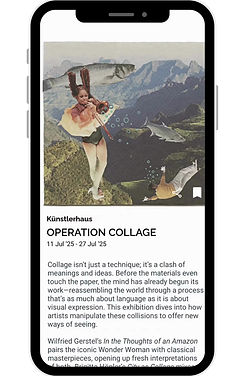
4. Tap on the bookmark icon
Look for the save/bookmark icon in the bottom right corner of the event image. Tap it once — it will change color to indicate it's saved.
5. Find your saved Events
Head to the Saved section via the menu at the bottom to see all exhibitions and other art events you've bookmarked. From here, you can plan your visits, get reminders, or remove saved events anytime.
Note: You must enable notifications for the myCulture app in your phone's settings


Now You're All Set!🎉
By saving exhibitions, you're not just bookmarking events — you’re crafting your own cultural itinerary.
Benefits of Saving:
-
Timely reminders before exhibitions end
-
Easier planning of your cultural routes
-
Better recommendations based on your interests
-
Keep track of what matters to you
Make the most out of your city’s vibrant art scene — one saved exhibition at a time.